Book an Appointment
Call Casselberry Computer Repair Service at 407-801-6120
                   

(407) 801-6120

*


Casselberry Computer Repair Service has provided the best mobile computer repair in Casselberry, FL and the greater Orlando Metropolitan Area since 1999. The term "mobile computer repair" means we come to you to resolve all your computer problems.

We repair laptops, desktops, PCs and Apple computers. One of our highly qualified staff will come to you, often the same day, to take care of all your repair needs.

Why not use the #1 rated company for computer repair in Casselberry, FL?

Computer Repair 4.9 / 5 stars from 309 reviews
Why use a computer tech when you can have a Casselberry based Computer Engineer? Mon-Sun 8:00am - 8:00pm

Call us at (407) 801-6120

Text us at (407) 801-6120

Email us your questions

Book an Appointment

"Excellent service, same day, actually same hour. 30 minutes and we were back working. A+"
Casselberry Computer Repair Service 5 / 5 stars
"Ben was very professional, answered questions, offered advise pleasantly. I appreciated his assistance in securing my computer."
Casselberry Computer Repair Service 5 / 5 stars
"Great service - from the initial phone call and scheduling - very upfront on costs - and ease of biz. Showed up on time, with a 15 min courtesy call -- he was professional, knowledgeable and gave great advice. He replaced my hard drive and got me back up and running. I would recommend this service. I chose it b/c of all the positive online reviews - and I was not disappointed. Nice job!"
Casselberry Computer Repair Service 5 / 5 stars
"Jason did an awesome job at explaining all the questions that we had! He will be our go to computer guru from now on! We highly recommend him!!"
Casselberry Computer Repair Service 5 / 5 stars
"Great service today! Fixed all of my issues and was very helpful in making suggestions on products to fit my needs. Arrived on time and was pleasant and professional. I will call again!"
Casselberry Computer Repair Service 5 / 5 stars

Who is Casselberry Computer Repair Service?

Casselberry Computer Repair Service is owned by Matt Karls, an Electrical Engineer and a Computer Systems Engineer. We are a team of computer professionals focused on Service and quality, all our work is guaranteed.

If you have any computer, technology or IT problem in Casselberry, FL we can fix it. We have been performing computer repair in Casselberry full time since 1999. Feel free to give us a call or text us at (407) 801-6120.

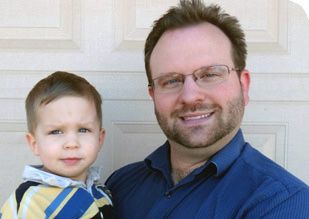
Casselberry Computer Repair Service's Computer Engineer

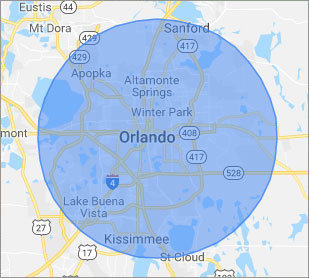
What is your Service Area for on-site Computer Repair?

Our primary on-site mobile service areas include the greater Orlando Metropolitan Area and the Phoenix, Tucson, Las Vegas, San Diego, Salt Lake City, Denver, Dallas-Fort Worth and Tampa metro areas.

We provide remote and mobile computer repair in Casselberry, Altamonte Springs, Apopka, Azalea Park, Belle Isle, Buena Ventura Lakes, Celebration, DeBary, DeLand, Deltona, Dr. Phillips, Fairview Shores, Geneva, Goldenrod, Hunter's Creek, Kissimmee, Lake Butler, Lake Mary, Lockhart, Longwood, Maitland, Meadow Woods, Oak Ridge, Ocoee, Orange City, Orlando, Oviedo, Pine Hills, Saint Cloud, Sanford, Southchase, Union Park, Wekiva Springs, Windermere, Winter Garden, Winter Park and Winter Springs.

Our on-site Computer Service Area

What should someone expect that hires you for Computer Service?

Our mission is to fully resolve your computer problems quickly and affordably. If you want a Computer Engineer that can fix all of your computer problems instead of a computer tech, a computer geek, a technician or a computer guy that can only fix some of your problems; call us at (407) 801-6120.  

What types of Computer Services do you perform?

We service businesses and business clients in their homes, including:
 
  • Diagnose / repair hardware or software problems
  • Spyware, malware, trojan and virus removal
  • Setup wireless and small business networks
  • Laptop repair, PC repair and Apple repair
  • Hard drive data recovery

Casselberry Computer Repair Service Contact Information

Casselberry Computer Repair Service
(407) 801-6120

Casselberry Computer Repair Service is a Karls Technology company

* *
*
*
*
  *
* *


*
*
* * * * * * * * * * * * * * *
4.9 / 5 stars from 309 reviews

"Awesome and very fun to talk with!"

Casselberry Computer Repair Service 5 / 5 stars

"Jason was the epitome of professionalism. He was so knowledgeable as well as thorough. I would use him anytime. I am extremely happy and thank you very much."

Casselberry Computer Repair Service 5 / 5 stars

"My whole experience was great. Ken was personal as well as professional. He was quick and efficient. I would highly recommend."

Casselberry Computer Repair Service 5 / 5 stars

"The service was prompt and professional and the price was right! Thank you very much!"

Ahwatukee Computer Repair Service 5 / 5 stars
Best Antivirus Software of 2026: The Ultimate Guide to Cybersecurity Brands

In 2026, the digital threat landscape has shifted. We are no longer just fighting simple viruses; we are defending against AI-generated phishing, sophisticated ransomware-as-a-service, and complex identity theft. Choosing the right antivirus brand is no longer optional—it is the foundation of your digital life. At Karls Technology, we’ve analyzed the top-performing security suites of the […] The post Best Antivirus Software of 2026: The Ultimate Guide to Cybersecurity Brands appeared first on Computer Repair Blog.

Windows Text-To-Speech

The Windows text-to-speech functionality is a vital aid for the visually impaired. It’s helpful if you learn best through listening or if you have reading difficulties like dyslexia. This function reads out loud everything you see on the screen, lists the currently running apps and windows, and more. Windows Narrator, a text-to-speech tool, is built […] The post Windows Text-To-Speech appeared first on Computer Repair Blog.

Upcoming VPN Feature on Windows 11

As of Windows 11, a message may soon appear in the system tray when you are connected to a VPN, allowing you to confirm that you are connected if you prefer anonymous browsing. Virtual Private Networks (VPNs) make it possible to surf the Internet without being traced. Unfortunately for companies, this location-insensitive technology is useless […] The post Upcoming VPN Feature on Windows 11 appeared first on Computer Repair Blog.

Adding Shortcuts to Desktop Taskbar

Pinning a new shortcut to your Windows taskbar makes it instantly accessible from wherever on your computer. To see every app on your Windows device, press the Windows key, then click All programs. To pin an app to the taskbar, right-click it, select “More,” and then click “Pin to taskbar.” If the program is already […] The post Adding Shortcuts to Desktop Taskbar appeared first on Computer Repair Blog.

Guide to Antivirus Brands in 2025

Karls Technology’s Comprehensive Guide to the Best Antivirus Brands in 2025 In today’s digital age, cybersecurity is more critical than ever. With the increasing number of cyber threats, from malware and phishing attacks to ransomware and identity theft, having reliable antivirus software is a necessity. The market is saturated with numerous antivirus brands, each offering […] The post Guide to Antivirus Brands in 2025 appeared first on Computer Repair Blog.

Update Routers to Prevent Bricking

Routers need firmware, like computers and phones. Like other devices, your router’s firmware must be updated. Many firmware updates are security remedies for router vulnerabilities. Hackers could take over your network through these weaknesses. You must periodically visit the “Support” area of your router’s manufacturer’s website for firmware updates. New updates should be implemented as […] The post Update Routers to Prevent Bricking appeared first on Computer Repair Blog.

New Feature for AirTags

Apple is currently working on an additional feature on Find My to allow AirTags to “chirp”. This is a small, but important accessory to their product. According to sources from 9to5Mac, AirTag and a few other third-party devices allow you to “ping” an accessory with a sound. With this revision, the same function will be […] The post New Feature for AirTags appeared first on Computer Repair Blog.

Secure Websites on Browsers

Whether you are just looking around, is planning to buy something, or you’re already a registered user, it’s important to stay vigilant with which websites you visit. Cybercriminals take advantage of unsecured websites. Many hackers aim to break into unprotected websites. This is because, in theory, a malicious actor could eavesdrop on your conversations on […] The post Secure Websites on Browsers appeared first on Computer Repair Blog.

Closing Windows with Shortcut

Pressing the Windows key + D instantly minimizes all open windows. By doing it this manner, you can avoid manually closing each window. To restore any minimized windows to their original position, hit the Win and D keys simultaneously. The desktop can be accessed by hitting the Windows key and the letter M. Apps like […] The post Closing Windows with Shortcut appeared first on Computer Repair Blog.

Downgrading Back to Windows 10

There are many new and improved features in Windows 11, and the OS may also be customized to your liking in terms of its look and feel. If you install Windows 11 and find that you don’t like it, you may always revert to a previous version. You can use this function for free for […] The post Downgrading Back to Windows 10 appeared first on Computer Repair Blog.